
Friends, if you’re also dreaming of buying a small home for your family in Mumbai or any major city in Maharashtra where your children can enjoy a good lifestyle, but your budget is very limited, then MHADA Lottery Registration could be your first and best step. In today’s digital age, MHADA has completely changed its system. The old paperwork process is now gone, and the new IHLMS 2.0 (Integrated Housing Lottery Management System) has been introduced.
The best thing about this new system is that it’s very fast, but yes, it is also a lil-bit technical. If you fill in even one detail incorrectly, your home can be canceled even after you win the lottery. That’s why, in this guide, I’ll explain to you like a friend exactly how you can easily fill out this form yourself on your computer or mobile phone, without paying any money to an agents.
Step-by-Step: MHADA Lottery Online Registration Quick Guide
If you’re in a hurry and want to see the entire process at a glance, here are the 5 main steps you need to follow while filling out this form:
- User Registration: First, create a new account by verifying your mobile number and email on the official MHADA website.
- Profile Building: Accurately enter your personal details, such as your Aadhaar card, PAN card, and family income information.
- Document Upload: Scan and submit necessary documents, such as proof of residence, ITR, etc., in digital format on the portal.
- Scheme Selection: Select your desired building and area according to your income slab (EWS/LIG/MIG/HIG).
- Payment: Make the payment online via the application fee and EMD (Earnest Money Deposit).
If you have the time and want to learn this process properly in detail, we’ve provided a step-by-step guide below—be sure to check it out.
Detailed Step 1: User Profile and Account Creation
The very first step in registration is “Identity Creation.” For this, you need to open MHADA’s official registration link in any browser. After that, you’ll create your own unique username and password.
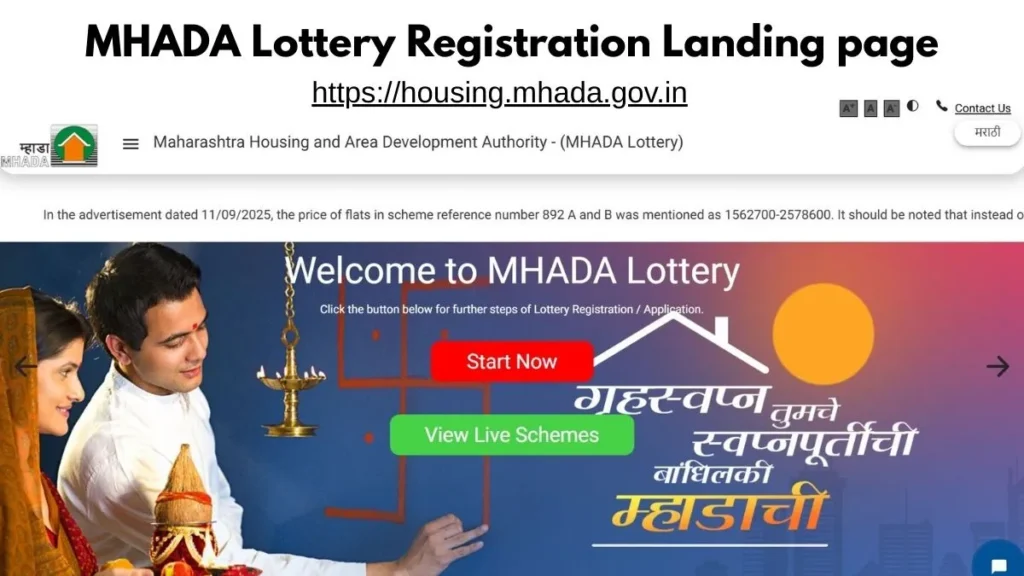
Please Note: Always use the same mobile number that is linked to your Aadhaar card. Since the entire MHADA system is OTP-based, if your number isn’t linked to your Aadhaar, the e-KYC process will stop there and your registration will remain incomplete.
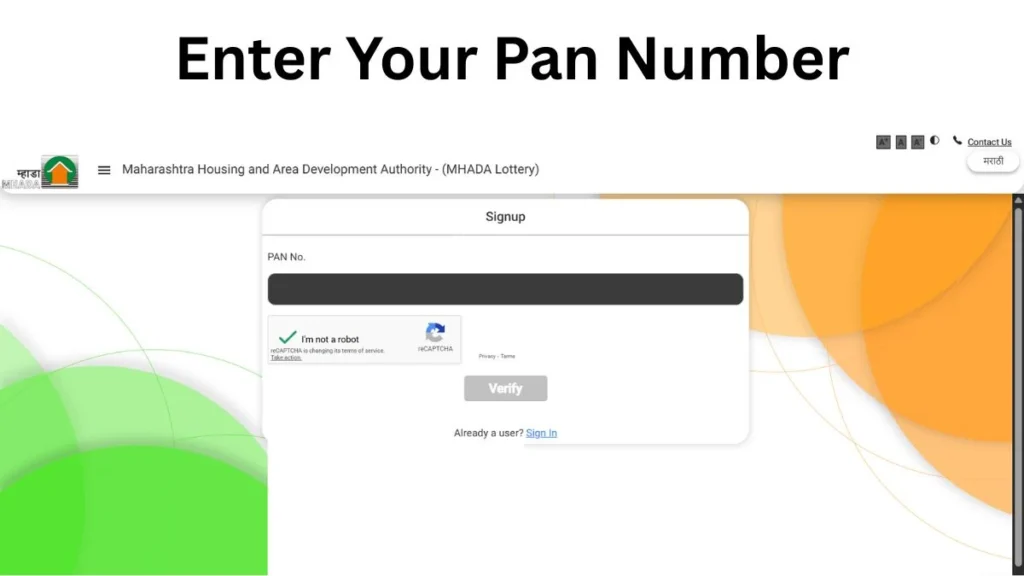
Once you fill in your basic details, you will need to upload a digital copy of your PAN card. Remember, MHADA checks your eligibility directly from the Income Tax Department’s database, so it’s crucial that the PAN card data and the information you’ve entered match exactly.
When registering, you should also choose your category like General, SC/ST, or PWD with very carefully, as it becomes difficult to change later. Therefore, enter the category you belong to when filling out the form.
Detailed Step 2: Documents Upload and e-KYC Verification
In the past, you had to visit the MHADA office repeatedly with your documents, but that’s no longer the case. MHADA has now introduced its IHLMS 2.0, a digital platform that has made the entire form-filling process completely digital. You have to complete the e-KYC, which means your identity will now be verified online. For this, your Aadhaar card must be fully updated with your mobile number.
Friends, please keep in mind that the scanned copies of your documents must be very clear. If the text is blurry, MHADA’s automated system may reject them.
List of Required Documents
You will need the following documents to fill out the MHADA form. Please check the table below and have your documents ready before you start filling out the form:
| Document Type | Why is this important? | Format |
| Aadhaar Card | For identity and e-KYC | PDF/JPG |
| PAN Card | For income verification | PDF/JPG |
| Domicile Certificate | Proof of 15 years of residence in Maharashtra | PDF/JPG |
| ITR / Salary Slip | To determine the Income Group (EWS/LIG, etc.) | |
| Caste Certificate | If you are applying under the reserved category. | PDF/JPG |
| Scanned Signature | Application form to authorize | JPG |
Detailed Step 3: Application Form and Scheme Selection
After you create a profile and the documents you uploaded are verified, you will see the “Active Lotteries” option. Here, you need to choose a scheme based on your preferred area and budget.
Suppose you are interested in the Pahadi Goregaon project in Mumbai, then you will have to select the specific Scheme Code for it.
Income Group Match: Always select the scheme that falls within your income slab. If your income is in the LIG (Lower Income Group) and you select MIG (Middle Income Group), your application is at risk of disqualification.
PMAY Preference: If you have registered with the Pradhan Mantri Awas Yojana (PMAY), be sure to enter your registration number here. This can help you qualify for a subsidy.
Detailed Step 4: EMD and Application Fee Payment
The final step is payment, because your registration will not be considered complete until you make the payment. You have to deposit the fees with MHADA for this.
- Application Fee: This is approximately ₹500 + GST and is non-refundable.
- EMD (Earnest Money Deposit): This is the amount you deposit as a ‘Baaney’ (earnest money deposit). It can range from ₹5,000 to ₹100,000, depending on the category.
- Payment Modes: You can use Net Banking, Credit/Debit Card, or UPI (GPay/PhonePe) to make the payment.
Important Note: After your payment is complete, be sure to download the Acknowledgement Receipt. This serves as proof of payment for your application.
If you want to check the rules and technical details on the official portal, you can visit the MHADA Official Housing Portal. This website also provides manual videos at every step to help you, which will make filling out the form even easier.
Common Mistakes: Avoid These Errors During Registration
Friends, I’ve seen many times that people do everything right, but because of one small mistake they lose their home. If you don’t want that to happen to you, pay special attention to the following points:
- Wrong Income Slab: First, calculate your gross annual income accurately. If your income is even ₹1 above the LIG slab and you applied under LIG, your verification will fail.
- Aadhaar-Mobile Mismatch: If your mobile number is not linked to your Aadhaar, you will not receive an OTP and will not be able to create a profile. To avoid this, update it in advance.
- Old Domicile: Make sure your Domicile Certificate is in digital format and clearly shows the 15-year criterion.
- Duplicate Profile: Never attempt to create two separate accounts with the same PAN card, as the system will immediately block it.
Conclusion: Your Dream, Your Preparation!
The MHADA Lottery Registration 2026 process may seem a bit lengthy at first glance, but if you follow the step-by-step instructions carefully, it will become very easy for you. Just keep the documents we mentioned above ready in digital format and don’t wait until the last minute for deadlines.
Frequently Asked Questions
Can I edit my details after registration?
Once your profile is locked, it’s difficult to change certain sensitive details like your PAN or category. However, updates such as your address and phone number can be changed by logging into the portal.
What should I do if the payment fails but money is still deducted from my bank account?
If this happens to you, do not make the payment again immediately. Instead, wait 24-48 hours, as the status is often updated automatically. If it doesn’t, you can contact MHADA by emailing their helpline.
Can a husband and wife both apply separately?
Yes, absolutely. Both can apply separately, but if both are selected in the lottery, MHADA will only permit you to keep one house. You will have to surrender the other.
What is the difference between the registration fee and EMD?
The registration fee, which is around ₹500, is a charge for the application process that is never refunded. The EMD (Earnest Money Deposit) is a security deposit that is fully refunded if you do not win the lottery.
Disclaimer: This guide is written for educational purposes only. We are not the official MHADA website. The rules and dates for 2026 may change, so before applying, always visit housing.mhada.gov.in to check the latest notifications.
